Benutzerrollen definieren, was jeder Benutzer in der BeNeering-Lösung sehen und tun kann. Sie werden verwendet, um den Zugriff auf Funktionen, Daten und Aktionen basierend auf den Verantwortlichkeiten eines Benutzers im Beschaffungsprozess zu steuern.
Durch die Zuweisung von Rollen können Unternehmen sicherstellen, dass Aufgaben wie das Erstellen von Bestellanforderungen, das Anlegen von Sourcing-Events, das Genehmigen von Bestellanforderungen oder Dokumenten, das Verwalten von Lieferanten und Katalogen oder das Anzeigen von Berichten von den richtigen Personen ausgeführt werden. Dies unterstützt eine stärkere Governance, Sicherheit und Compliance.
Rollen in der Einkaufsanwendung können Organisationselementen und Teams zugewiesen werden. außerdem können an einem Benutzer im Rahmen des Single-Sign-On-Verfahrens ad hoc zugewiesen werden.
Diese Tabelle enthält alle Rollen, die ein Administrator einem Benutzer zuweisen kann. Einige dieser Rollen können zusätzlich Vertretungen (Substitutes) zugewiesen werden
Einige dieser Rollen können zusätzlich Vertretungen (Substitutes) zugewiesen werden, wenn ihre Organisation für diese Rollen autorisiert ist.
|
Module |
Funktion |
Vertretung zuweisen |
Kombinierte Rolle |
Rollenbeschreibung |
|
Org Management |
EINKÄUFER |
|
ORGANIZATION_USER_ADMIN |
Benutzer anlegen und ändern sowie Rollenzuweisen |
|
|
ORGANIZATION_ORG_ADMIN |
Anlegen und Bearbeiten von Käufer- und Lieferantenorganisationen sowie Zuweisung von Rollen zu Käuferorganisationen. |
||
|
|
ORGANIZATION_TEAM_ADMIN |
Anlegen und Bearbeiten von Teams sowie Zuweisung von Mitarbeitern für die Einkaufsanwendung und von Benutzern für administrative Aufgaben |
||
|
|
ORGANIZATION_INVITE_CATALOG_SUPPLIER |
Einladung neuer Lieferanten zur Registrierung für das Katalogmanagement auf BeNeering. |
||
|
|
ORGANIZATION_INVITE_SOURCING_SUPPLIER |
Einladung neuer Lieferanten zur Registrierung für Sourcing auf BeNeering. |
||
|
|
ORGANIZATION_INVITE_ORDER_SUPPLIER |
Einladung neuer Lieferanten zur Registrierung für die Bestellzusammenarbeit auf BeNeering (z. B. zum Hochladen von Leistungsnachweisen). |
||
|
LIEFERANT |
|
ORGANIZATION_ORG_ADMIN |
Bearbeitung von Lieferantenorganisationen inkl. Name, Adresse und Kontaktdaten |
|
|
|
ORGANIZATION_USER_ADMIN |
Lieferantenbenutzer anlegen und bearbeiten |
||
|
Katalogmanagement |
EINKÄUFER |
|
CATALOG_ADMIN |
Katalogcontainer, Katalogansichten und Katalogfreigaben erstellen und verwalten |
|
|
CATALOG_APPROVER |
Benutzer können Kataloge freigeben |
||
|
|
CATALOG_CONTENT_CREATOR |
Kataloge hochladen, Bilder hochladen, Kataloggültigkeit verlängern und Kataloganreicherung verwalten |
||
|
LIEFERANT |
|
CATALOG_CLASSIFICATION |
Lieferantenspezifische Quellenklassifizierung pflegen |
|
|
|
CATALOG_CONTENT_CREATOR |
Kataloge, Bilder und andere MIME-Objekte hochladen |
||
|
MEDIENBIBLIOTHEK |
EINKÄUFER |
|
MEDIA_ADMIN |
MIME-Objekte hochladen, verschieben, umbenennen und löschen |
|
LIEFERANT |
|
MEDIA_ADMIN |
MIME-Objekte hochladen, verschieben, umbenennen und löschen |
|
|
BESCHAFFUNG |
EINKÄUFER |
|
SOURCING_RFQ_LIST |
Beschaffungsereignisse erstellen und Lieferanten zur Angebotsabgabe einladen |
|
LIEFERANT |
|
SOURCING |
Lieferantenrolle im Sourcing zur Einsicht von Anfragen und zur Angebotsabgabe an den Kunden |
|
|
EINKAUF |
EINKÄUFER |
|
PURCHASING_DEMAND_OWNER |
Auf die Bedarfsliste zugreifen und Details bearbeiten |
|
|
PURCHASING_DEMAND_MANAGER |
Auf die Bedarfsliste zugreifen, Details bearbeiten und auf das Demand Center zugreifen, von dem aus Mitarbeitende Artikel in den Warenkorb legen können |
||
|
|
PURCHASING_RESERVATION |
Auf die Reservierungsliste und deren Details zugreifen |
||
|
|
PURCHASING_BASKET_ADMINISTRATION |
Das Support-Team kann den Warenkorb eines Benutzers übernehmen, manuell bearbeiten und übertragen, wobei die kundenspezifische Validierungslogik umgangen wird.
|
||
|
|
PURCHASING_BASKET_EDIT_MANDATORY |
Schnellabsende-Button im Warenkorb deaktivieren und den Benutzer dazu zwingen, den Warenkorb vor dem Absenden zu bearbeiten |
||
|
Ja |
PURCHASING_PR_LIST |
Zugriff auf die Liste der Bestellanforderunge |
||
|
Ja |
PURCHASING_PR_EDIT |
Bestellanforderung bearbeiten |
||
|
|
PURCHASING_PR_LIST_ITEMS |
Zugriff auf Positionen der Bestellanforderung |
||
|
|
PURCHASING_ADVANCED_SEARCH_DISPLAY |
Bei Zuordnung zu einer Einkaufsorganisation oder einem Team erhalten Sie Zugriff zur Anzeige aller Dokumente innerhalb Ihrer Organisation. Filter für Buchungskreis, Werk und Einkaufsorganisation werden automatisch anhand Ihres Benutzerprofils angewendet |
||
|
|
PURCHASING_ADVANCED_SEARCH_EDIT |
Bei Zuordnung zu einer Einkaufsorganisation oder einem Team erhalten Sie Zugriff zur Bearbeitung aller Dokumente innerhalb Ihrer Organisation. Filter für Buchungskreis, Werk und Einkaufsorganisation werden automatisch anhand Ihres Benutzerprofils angewendet. |
||
|
|
PURCHASING_PR_POST_EDIT |
Mitarbeitenden erlauben, eine Bestellanforderung nach Genehmigung und Zugriff auf die Historie der Bestellanforderung |
||
|
|
PURCHASING_PO_DISPLAY |
Zugriff auf die Bestellung im Anzeigemodus |
||
|
|
PURCHASING_PO_EDIT |
Bestellung bearbeiten |
||
|
|
PURCHASING_PO_LIST |
Zugriff auf die Bestellliste |
||
|
|
PURCHASING_PO_LIST_ITEMS |
Zugriff auf die Bestellpositionen |
||
|
|
PURCHASING_GR_LIST |
Zugriff auf die Liste der Wareneingänge |
||
|
|
PURCHASING_GR_DISPLAY |
Zugriff auf Wareneingangsdetails |
||
|
Ja |
PURCHASING_CONFIRMATION_CREATE |
Bestätigung anlegen |
||
|
|
PURCHASING_GR_CANCEL |
Storno-Button in Wareneingangsdetails und Wareneingangsliste |
||
|
|
PURCHASING_SES_DISPLAY |
Zugriff auf die Leistungsnachweis-Liste und deren Details |
||
|
|
PURCHASING_SES_ACCEPTANCE |
Leistungsnachweise in SAP annehmen, angenommene Leistungsnachweise in SAP widerrufen sowie Leistungsnachweise in SAP löschen, sofern sie sich nicht im Status ‚Angenommen‘ befinden |
||
|
|
PURCHASING_SES_DOWNLOAD |
Download von Leistungsnachweisen ermöglichen |
||
|
|
PURCHASING_SUBSTITUTION_ADMIN |
Vertretungsregelungen für Benutzer administrieren |
||
|
|
PURCHASING_GLOBAL_FAVOURITES_ADMIN |
Als Administrator Zugriff auf globale Favoriten |
||
|
|
EMPL_SETTINGS_CREATE_EMPLOYEE |
In den persönlichen Benutzereinstellungen die Möglichkeit aktivieren, im Reiter ‚Vertretung‘ neue Mitarbeitende anzulegen |
||
|
|
EMPL_SETTINGS_ORGANIZATION_EDIT |
In den persönlichen Benutzereinstellungen können Mitarbeitende Organisationsdaten wie Buchungskreis, Werk und Einkaufsorganisation bearbeiten |
||
|
|
EMPL_SETTINGS_DELIVERY_EDIT |
In den persönlichen Benutzereinstellungen können Mitarbeitende Lieferadressen bearbeiten |
||
|
|
EMPL_SETTINGS_ACCOUNTING_EDIT |
In den persönlichen Benutzereinstellungen können Mitarbeitende Buchhaltungsdaten wie Kostenstellen bearbeiten |
||
|
Ja |
SUBSTITUTE_SHOP_ON_BEHALF |
Nur bei der Zuweisung von Vertretungen: Einer Person Zugriff gewähren, in Ihrem Namen Einkäufe durchzuführen |
||
|
|
ORDERING |
Der Lieferant erhält Zugriff auf vom Kunden empfangene Bestellungen, kann Bestellungen bestätigen und Leistungsnachweise erfassen |
||
|
BESTELLUNG |
LIEFERANT |
ORDERING_RECEIVE_EMAIL |
Der Lieferant erhält eine E-Mail-Benachrichtigung, wenn eine neue Bestellung des Kunden auf BeNeering eingehen |
|
|
GENEHMIGUNG |
EINKÄUFER |
Ja |
APPROVAL_DEMAND |
Bedarfsdokumente genehmigen |
|
EINKÄUFER |
Ja |
APPROVAL_PURCHASE_REQUISITION |
Bestellanforderungen genehmigen |
|
|
EINKÄUFER |
Ja |
APPROVAL_PURCHASE_ORDER |
Bestellungen genehmigen |
|
|
EINKÄUFER |
Ja |
APPROVAL_SOURCING_RFQ |
Sourcing-Events genehmigen |
|
|
EINKÄUFER |
Ja |
APPROVAL_SOURCING_RFM |
Lieferantenangebote genehmigen |
|
|
EINKÄUFER |
Ja |
APPROVAL_SERVICE_ENTRY_SHEET |
Leistungsnachweise genehmigen |
|
|
EINSTELLUNG |
EINKÄUFER
|
|
SETTINGS_BUSINESS_PARTNER |
Geschäftspartner-Mapping zwischen dem SAP-System des Kunden und der BeNeering Cloud (z. B. erforderlich für die Dienstleistungsbeschaffung) |
|
|
SETTINGS_EMAIL_TEMPLATES |
E-Mail-Vorlagen bearbeiten |
||
|
|
SETTINGS_CLOUD_FORMS_LIST |
Zugriff auf die Cloud-Formularliste und Detailansicht, beschränkt auf ‚Produkt‘-Formulare |
||
|
|
SETTINGS_CLOUD_FORMS_ADVANCED |
Zugriff auf die Cloud-Formularliste und Detailansicht, einschließlich Produktformulare sowie aller weiteren zur Systemverwaltung verwendeten Formulare |
||
|
|
SETTINGS_CLOUD_FORMS_EDIT |
Benutzern erlauben, Cloud-Formulare zu bearbeiten |
||
|
|
SETTINGS_VALIDATION_RULES |
Zuweisung von Regelpaketen und Vorlagen im Katalogmanagement-Modul erlauben |
||
|
KI |
EINKÄUFER |
|
AI_CHATBOT_ITEM_RETRIEVER |
Zugriff auf die Nutzung der Katalog-KI |
|
|
AI_CHATBOT_WIKI_CUSTOMER |
Zugriff auf kundenseitig erstellte Dokumentation |
||
|
|
AI_CHATBOT_WIKI_BUYER |
Zugriff auf die von BeNeering erstellte Hilfedokumentation zur allgemeinen Nutzung der Plattform |
||
|
|
AI_INTAKE_DOC_SCANNER |
Dokumentenscan-Funktion innerhalb des Intake-Assistenten nutzen |
||
|
|
AI_INTAKE_ITEM_RETRIEVER |
Katalog-KI-Funktion innerhalb des Intake-Assistenten nutzen |
||
|
|
AI_INTAKE_FREETEXT |
Geführte Freitext-Funktion innerhalb des Freitext-Assistenten nutzen |
||
|
|
AI_TOOLS_SUMMARY_BASKET |
Der Warenkorbname wird automatisch durch KI generiert, basierend auf der Zusammenfassung aller im Warenkorb enthaltenen Positionen |
||
|
AUSWERTUNGEN |
EINKÄUFER |
|
ANALYTICS_DEFAULT |
Zugriff auf verschiedene Reports im Download Center sowie Berechtigung zur Erstellung neuer Reports“ |
|
|
ANALYTICS_BILLING_REPORT |
Zugriff auf Abrechnungsreports, die je Einkaufsorganisation erstellt werden |
||
|
|
ANALYTICS_USER_LOG |
Zugriff auf Benutzerpezifischen Reports |
Rolle einem Benutzer zuweisen
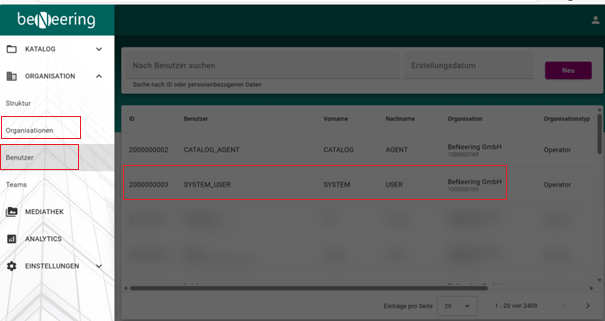
Der Administrator einer Organisation hat die Möglichkeit, Benutzerrollen bestehenden oder neuen Benutzern zuzuweisen. Gehen Sie dazu bitte auf Organisation → Benutzer
Im Anschluss wählen Sie den Benutzer aus, dem sie die Benutzerrollen zuweisen wollen.
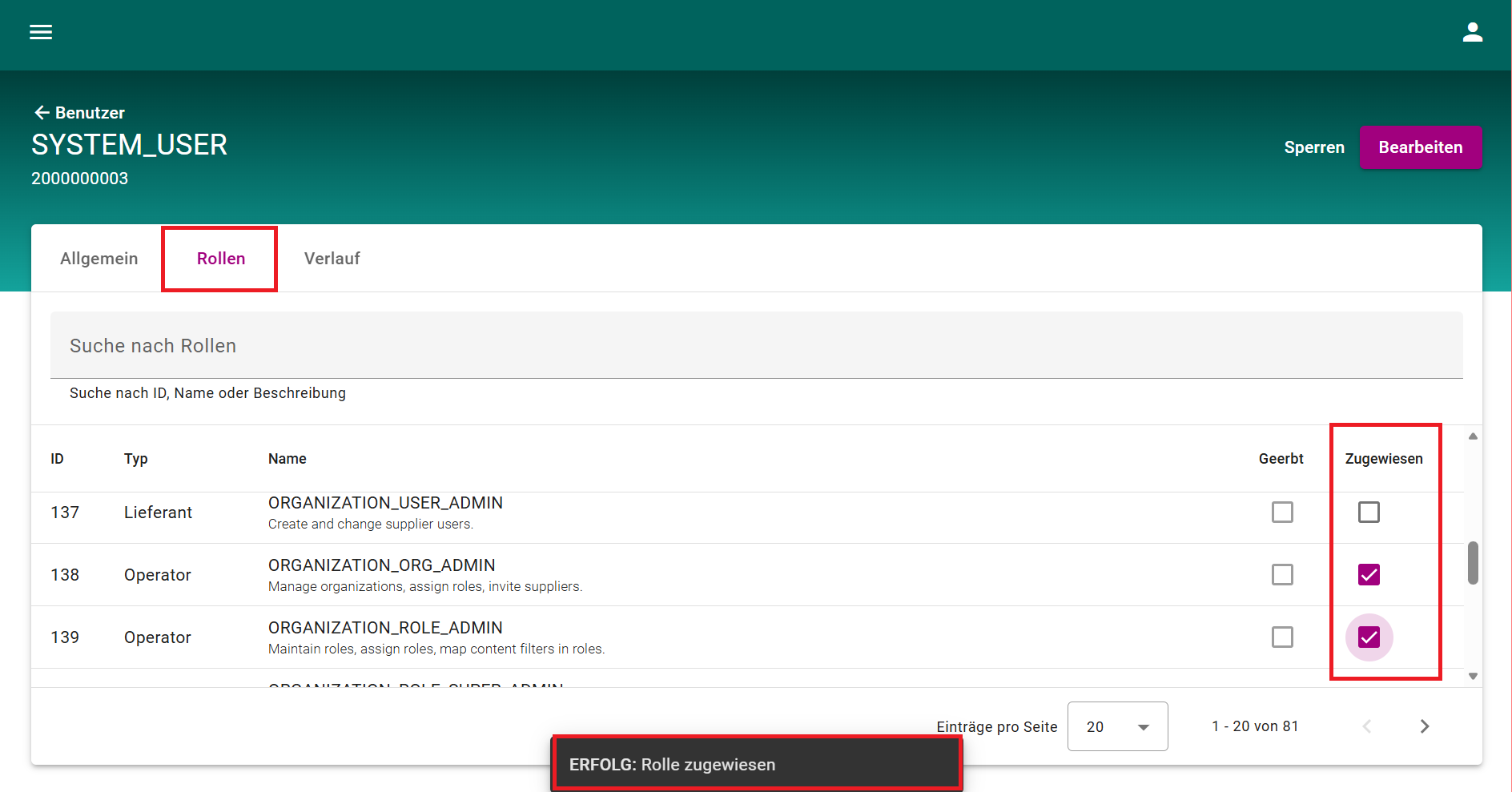
Im Tab ‚Rollen‘ die gewünschten Rolle(n) dem Benutzer zuweisen. Nach erfolgreicher Zuweisung wird eine Systemmeldung angezeigt, die den Abschluss bestätigt