A short system downtime can be expected between 8 pm and 11 pm CET.
Preface
We are pleased to share details of the upcoming release, which introduces a set of new functionalities and enhancements designed to improve efficiency, user experience, and flexibility across the platform. These updates reflect our ongoing commitment to deliver solutions that support your business needs and evolving procurement processes.
This release is planned as a minor release, not having an impact on customers that do not use described functionality.
Please note that while some of the features will be deployed automatically as part of the standard release, others are optional and may require additional configuration, enablement, or consulting services. These functionalities will not be activated by default but can be implemented upon request in alignment with your organization’s requirements.
We encourage you to review the release notes carefully and contact your consulting team if you wish to learn more about enabling specific features. Or write to support@beneering.com with a specific query so we are happy to assist you.
Icon
Description
✅
This feature is global standard means active for all customers
⚙️
This feature is free of charge, it can be activated or deactivated
⚠️
This feature requires an update of the SAP Add-On “BeNeering Cloud Adapter” (BCA)
💲
This feature requires additional implementation efforts on your system - please ask for a quotation if you are interested
Generic Functions
Important Reminder : Support email change will no longer be forwarded
The old email support@mycatalogcloud.com will be discontinued and not forwarded anymore. The email support@beneering.com is active since our last release and announcement. Use this email for all requests. ✅
Function create organization move from old CCS (url) to BC (url)
The creation of new organizations is no longer possible on the old catalog management system https://www.mycatalogcloud.com/. Organizations can be only created on BeNeering Cloud by administrators, who are assigned the necessary role. ✅
Message Center Redesign
The Message Center has been redesigned to align with the look and feel of the PR detail screen. The new layout offers a dedicated message view, improved navigation, and filtering capabilities for a more consistent and intuitive experience. 💲
Messages now display reference document type and ID
Public messages (where the user is not a recipient) are visible only in document details
The message detail view allows users to reply within the same screen and includes attachments and participant visibility features
Message creation is temporarily disabled from this screen
Navigation follows the same behavior as message notifications, directing users to document approvals or details
This change provides a modern, unified, and user-friendly interface for managing communications across documents, ensuring consistency and clarity in future expansions of the messaging feature.
Reference: CDEV-11623 💲
AI Functions
Chat Bot Feature - Wiki & Catalog Agent Improvements
Our chat bot AskBen has been enhanced for better performance and stability. In particular, the WIKI-Agent has received additional features in our RAG model.
Dynamic generation of Wiki Pages in the BeNeering Enviroment
Translation of Content into User languages
The Catalog-Search-Agent has been enhanced to make a better proposal for catalog items. 💲
Reference: CDEV-11466 💲
Go-Live INTAKE ASSISTANT
We are pleased to announce the Go-Live of our Intake Assistant for pilot customer usage. The Intake Assistant is fully embedded into the guided buying procedures, so it helps requesters and buyers to order a demand. Please check our videos by following the links. The following functions are supported:
User can upload a proposal in PDF format that was received from a supplier. This proposal is validated against material group and suppliers that are available in the SAP system. Video LINK
User can specify a request by providing a description. AI will analyze this demand and propose a material group and a supplier if possible. Video LINK
The Intake assistant will guide the user through the process. In addition, a purchasing compliance check is applied (simplified version).
Reference CDEV-11183 💲
Improvement for Material Group assignment
The agent to determine the material group is continuously improved. We are planning to deliver improvements in this area on an ongoing basis, independent of this release. 💲
Buyer Functions
EMPLOYEE SETTINGS
Correction for multi-backend scenario
Logic for customers working in a multi-backend scenario is improved. Employees can switch from one SAP backend to another SAP backend in employee settings, or by selecting the correct company in the Cross-Company-Buying selection box. 💲
Reference: CDEV-11077 ✅
SOURCING
RFQ submit / send to approval button in create/edit screen
Message type changed from warning to error. Text of message will be as following “Please complete all steps before submitting. Make sure you have gone through each step in order and reached the final one.”
Reference: CDEV-11709 ✅
PURCHASING
Multi-Backend Scenario improvements
The logic for multi-backend scenarios has been enhanced, allowing users and buyers to edit purchase requisitions that belong to a different SAP Backend System and/or Company Code than the default system assigned to the user performing the change.
Reference: CDEV-11077 ✅
Central Workflow - Approval Inbox improvements
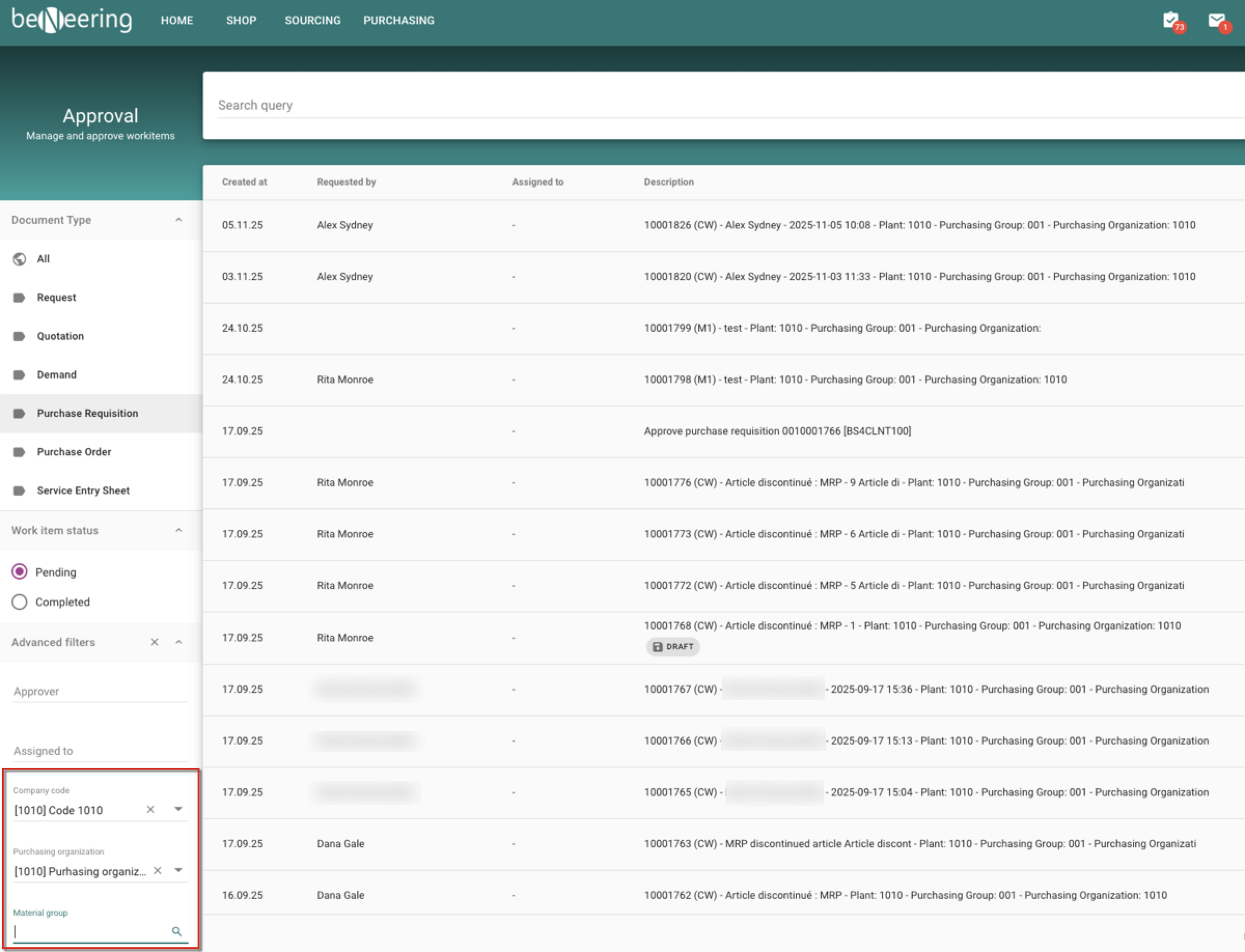
For customers working in a multi-backend scenario, there was a need to consolidate filters in the Approval Inbox. The redesign of the filters selection allows buyers to select a company code and purchasing organization independent of the SAP backend system.
Once a company code or purchasing organization has been selected, another filter for material group is becoming available. The search for material group is performed against the selected SAP backend system.
Approval Inbox - Filters supporting Multi-Backend and Material Group selection
Reference: 11524 ⚙️
New API to create Demand documents in purchasing via legacy system
A new API is becoming available, supporting the creation of Demand documents by API. For example, this feature can be used to connect external scanner, creating demand document in Purchasing.
Reference: CDEV-11147 💲
Demand documents can be sent for approval
The document type ‘Demand’ has been enabled on the Central Workflow engine. This means, demand documents can be sent for completion and approval.
Reference: CDEV-11147 💲
Additional fields in Approval screen for Service Entry Sheets
If your suppliers are submitting Service Entry Sheets via BeNeering Cloud supplier portal and the approval for these Service Entry Sheets is activated in Guided Buying, then you will find additional fields in your Approval inbox. By selecting the document type ‘Service Entry Sheet’ in your Approval inbox, you will see supplier and Purchase Order number as additional fields.
Reference: CDEV-11524 ✅
Workflow API enhancements
The Central Workflow engine on BeNeering Cloud is designed as an open system, that can be accessed by API too. With this release we are introducing the possibility to control the Add-Hoc approval step by API calls.
Reference: CDEV-12022 💲
Dynamic Cloud Forms 2.0 - bug fixes and small improvements
With previous release we have introduced our new DCF 2.0 framework. With this release we are delivering bug fixes and smaller improvements.
Reference: CDEV-11837 ✅
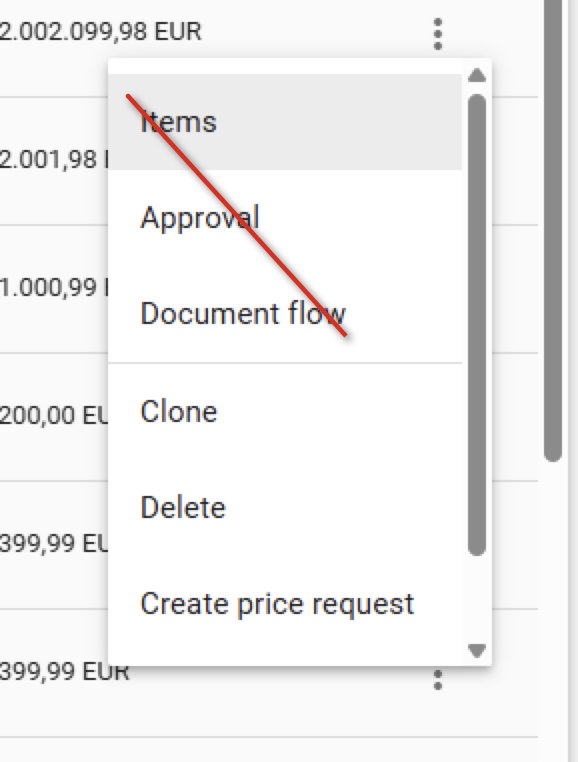
Simplification of context menu in Purchasing
As the context menu in purchasing list is growing by adding new functionality, we are removing these entries that only point to a tab in the purchasing document. We keep in this context menu only functions.
Simplification of context menu in purchasing list
Reference: CDEV-11654 ✅
Admin Functions
Relocation of Cloud Forms module to Settings section in menu
The Cloud Forms module has been moved to the Settings section to improve the logical responsibility. This change provides a more intuitive user experience by grouping configuration options in one place, called settings.
Reference: CDEV-11884 ✅
Introduction new Transport Management System
We are introducing a new transport management system that is used to transport Role Definition, Dynamic Cloud Forms and other objects from development system to QA, and from there to Production. This means, from now on Roles and Dynamic Cloud Forms can be created and changed only on the development system.
Roles can be pushed to QA and Production by the new Transport Functionality.
Dynamic Cloud Forms can be pushed to QA and Production only by Download and Upload. The transport route will be introduced at later stage.
We will continue leveraging this new transport management function for other customizing objects too. ✅
Supplier Functions
Service Entry Sheet on supplier portal support adding unplanned items, planned PO items and catalog items
We have extended the functionality in the Service Entry Sheet. Until now, suppliers could only select items from the Contract when posting a Service Entry Sheet. As of now, suppliers can add
unplanned items
Prerequisite: The Purchase Order must have a limit assigned and the SES Template must be customized to support unplanned items)
planned items
Prerequisite: The Purchase Order must have planned service items assigned, so the user can select these items for adding to the SES document
contract items supporting catalog items (without reference to SAP contract)
Prerequisite: The Purchase Order must have a limit assigned. The SES Template must be customized to support catalog items, not contract items. A business partner mapping is necessary to map the SAP supplier with the BeNeering Supplier Organization. A supplier catalog must be assigned to this business partner.