
Table of Contents
Do I need to install SSL/TLS certificates?
The BeNeering certificate chain consists of three certificates:
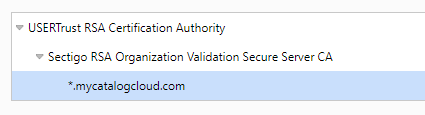
If your procurement system requires a server-to-server connection to BeNeering Cloud and you only have the “*.mycatalogcloud.com” certificate installed, then you will have to upload our new certificate to your procurement server. In the end you will need only one certificate from the chain in STRUST.
The parent certificates have the following expiring dates:
-
Sectigo RSA Organization Validation Secure Server CA: 01.01.2031
-
USERTrust RSA Certification Authority: 01.01.2029
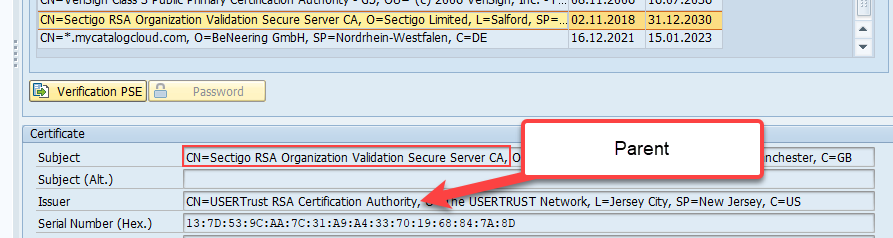
Therefor we would recommend installing one of the parent certificates (1) or (2) to not have an action each year.
Remark: In SAP itself you can always see the parent certificate in STRUST like here:
ATTENTION: If you do not upload a valid certificate, then impacted Cloud services will stop working for you. Example for scenarios using our SSL/TLS certificates:
-
SAP API/CPI or other Middleware solutions supporting web service routing to BeNeering Cloud via SOAP and REST protocols. Update our certificate on your middleware solution..
-
S/4HANA login request to BeNeering Cloud, when issued via Fiori Launchpad. You will need to update the SSL certificate on your SAP S/4HANA.
-
SAP ECC login request to BeNeering Cloud, when issued via Fiori Launchpad. You will need to update the SSL certificate on your SAP NetWeaver.
-
Microsoft Azure AD or other Single-Sign-On providers using BeNeering Cloud access. Please verify on the test-system if new certificate will be working without the need to adjust this service.
-
SRM UI5 (SAP NetWeaver) is sending an https Web-Service call to myCatalogCloud reading catalog items when user is adding item to Shopping Cart. Check the Web Service Port in SOAMANAGER if configured for direct access to myCatalogCloud.com. If yes, you will need to update the SSL certificate on your SAP NetWeaver.
-
Oracle iPro is sending an https request to myCatalogCloud with login request. Typically, this request has been configured on your Oracle server to run with https. You will need to update the SSL certificate on that Oracle server.
Which addresses are impacted?
In general, all addresses *.mycatalogcloud.com are impacted. Generic system setup is like this:
-
testing.mycatalogcloud.com (access to testing / QA system)
-
www.mycatalogcloud.com (access to production Stack Front-End)
-
digital.mycatalogcloud.com (access to production Stack DC4)
-
ftp.mycatalogcloud.com (ftp access)
Customers using the My Cart scenario are configured by customer specific subdomain:
-
customerName-d.mycatalogcloud.com (access to development / DEV system)
-
customerName-t.mycatalogcloud.com (access to testing / QA system)
-
customerName.mycatalogcloud.com (access to production Stack Front-End)
Is this certificate needed for OCI4 access (Punch-Out)?
Customers connecting via Punch-Out to BeNeering Cloud you do not have to update the certificate as long as a server-to-server connection is not used.
A server-to-server connection might be used for Punch-Out connections in the following cases:
-
Login procedure is using Secure OCI5 authentication
-
SAP SRM Server has activated features like Price Validate or Product Check while a user is editing a Shopping Cart
How do I receive the new certificates?
You will receive the certificates by a download link. You can also download the certificate through your browser from our Web Site, but only after we have published this to our servers. See our schedule for publishing certificates as delivered in separate communication.
Is BeNeering the owner of the certificates?
Yes, BeNeering is the owner of the certificates and we are providing the public keys to all our customers for download.
How can I download or verify the active certificate?
You can verify the certificate owner and validity by following below steps:
-
Open this URL https://testing.mycatalogcloud.com, e.g. from your Chrome browser for access to our QA/Testing environment
-
Open this URL https://www.mycatalogcloud.com, e.g. from your Chrome browser for access to our Production environment
-
Ignore the message shown in browser
-
Click on the lock symbol close to the URL and select “Certificate” in this dialog. The you will see our certificate information for verification and/or download

-
Make sure that Authorizing Party is *.mycatalogcloud.com and Valid To Date is 23.12.2025
-
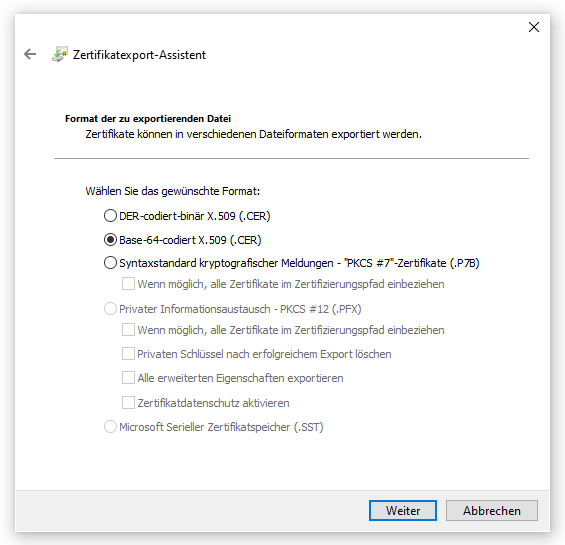
You can download the certificate by clicking on “Details” tab and then following the Wizard to download this certificate
-
As an alternative to download our certificate provided Link, you can download it from here. You can use this certificate in Base-64 format for import into your SAP NetWeaver system
How to install the certificate on a SAP NetWeaver system?
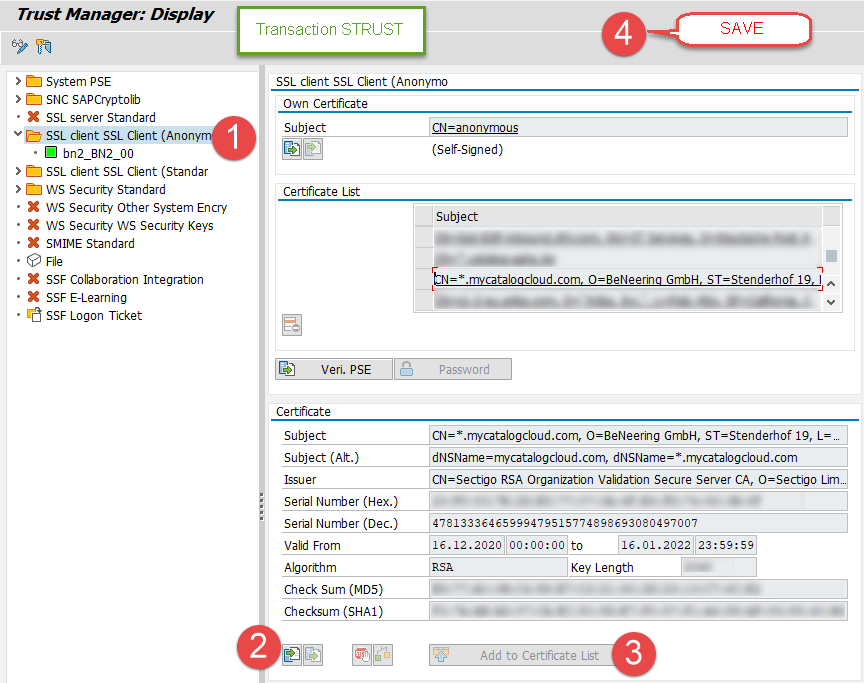
If you are using server-to-server authentication on your SAP NetWeaver / SAP SRM / S/4HANA / SAP ECC system, then you have to upload our certificate to your SAP server. Otherwise, the login session cannot be established.
-
Run transaction STRUST on SAP NetWeaver and select SSL Client (Anonymous)
-
Upload the new SSL certificate (CER file)
-
Do not forget to add this certificate to the Certificate List
-
Do not forget to Save this transaction
ATTENTION: it might be necessary for you to delete the old wildcard (*) certificate if you have not installed the parent RSA certificates, otherwise the outbound connection from your SAP to myCatalogCloud.com might stop working.
SSL Certificate Renewal for myCatalogcloud.com.pdf