
Viewing the Document Flow in MyCart
In the MyCart tool, you can track the complete Document Flow of a Purchase Requisition (PR). This allows you to view all related documents and their statuses in a structured manner.
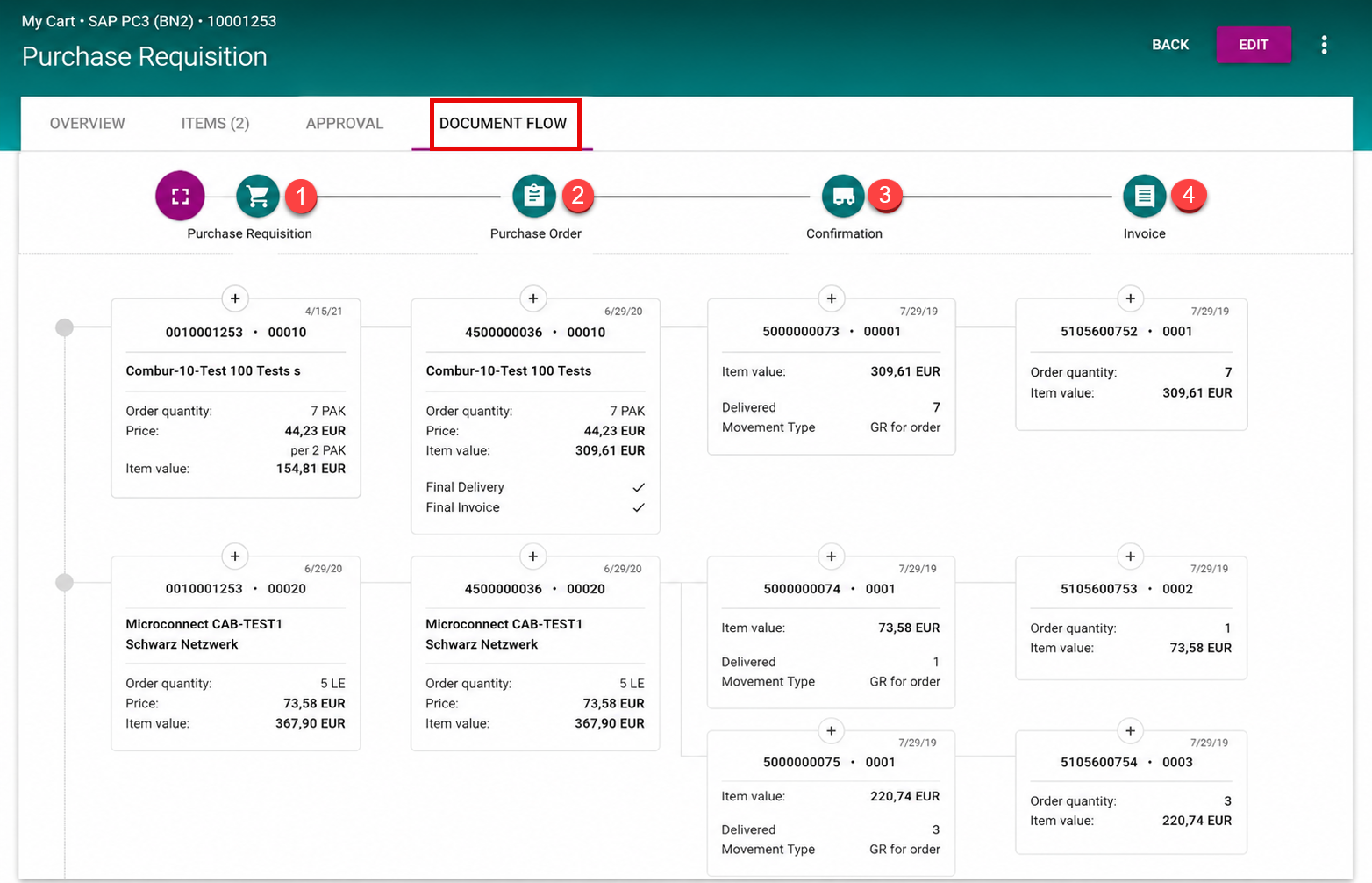
Accessing the Document Flow
-
Navigate to the detail page of the PR.
-
Select the DOCUMENT FLOW tab (1).
This section provides an overview of all documents associated with the selected PR, categorized as follows:
-
Purchase Requisition
-
Purchase Order
-
Goods Receipt
-
Invoice
Document Details
Each document type includes specific data fields:
-
Purchase Requisition:
-
Order quantity
-
Price
-
Item value
-
-
Purchase Order (PO):
-
Order quantity
-
Price
-
Item value
-
Final delivery status
-
Invoice information
-
-
Goods Receipt (GR):
-
Item value
-
Delivered quantity
-
Movement type
-
-
Invoice:
-
Order quantity
-
Item value
-
You can expand or collapse the document details for all entries at once (2) or filter them by specific categories (3).
Additionally, clicking on a document ID allows you to jump directly to the corresponding document for more details.
Video of the function