
Beschreibung
Auf dieser Seite finden Sie eine Übersicht darüber, welche HTML-Tags in CSE verwendet werden können.
Schritt für Schritt Anleitung
Inline Elements
|
Tag |
Beispiel |
Ergebnis |
|---|---|---|
|
a |
<a href="https://www.w3schools.com">Visit http://W3Schools.com !</a> |
|
|
abbr |
<p>The <abbr title="World Health Organization">WHO</abbr> was founded in 1948.</p> |
The WHO was founded in 1948. |
|
acronym |
Can I get this <acronym title="as soon as possible">ASAP</acronym>? |
Can I get this ASAP? |
|
b |
<b>Text</b> |
Text |
|
bdi |
<ul>
|
|
|
bdo |
<p>This paragraph will go left-to-right.</p>
|
This paragraph will go left-to-right. This paragraph will go right-to-left. |
|
big |
<p>This text is normal.</p>
|
This text is normal. This text is bigger. |
|
br |
<b>Text</b><br> |
Text¶ |
|
cite |
<img src="img_the_scream.jpg" width="220" height="277" alt="The Scream">
|
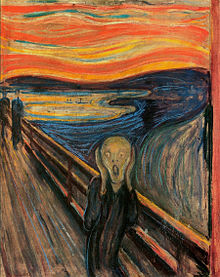
The Scream by Edward Munch. Painted in 1893. |
|
code |
<code>A piece of computer code</code><br> |

|
|
del |
<p>My favorite color is <del>blue</del> <ins>red</ins>!</p> |
My favorite color is |
|
dfn |
<p><dfn>HTML</dfn> is the standard markup language for creating web pages.</p> |
HTML is the standard markup language for creating web pages. |
|
em |
<em>Text</em> |
Text |
|
font |
<font color=#FF0000>Text</font> |
Text |
|
i |
<i>Text</i> |
Text |
|
img |
<img src="img_the_scream.jpg" width="220" height="277" alt="The Scream"> |
|
|
ins |
<p>My favorite color is <del>blue</del> <ins>red</ins>!</p> |
My favorite color is |
|
kbd |
<kbd>Keyboard input</kbd><br> |

|
|
label |
<form action="/action_page.php">
|
BMW |
|
map |
<p>Click on the sun or on one of the planets to watch it closer:</p> <img src="planets.gif" width="145" height="126" alt="Planets" usemap="#planetmap"> <map name="planetmap">
|
Click on the sun or on one of the planets to watch it closer: 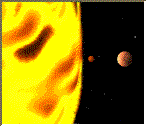
|
|
mark |
<p>Do not forget to buy <mark>milk</mark> today.</p> |

|
|
p |
<p>Text</p> <b>Text</b> |
Text
Text |
|
pre |
<pre>Text Text Text Text Text Text</pre> |
Text Text Text Text Text Text |
|
q |
<p>Julius Cesar said:
|
Julius Cesar said: Veni Vidi Vici. A great sentence. |
|
ruby |
<ruby>
|

|
|
rp |
<ruby>
|

|
|
rt |
<ruby>
|
|
|
s |
<p><s>My car is blue.</s></p>
|
My new car is silver. |
|
samp |
<samp>Sample output from a computer program</samp><br> |

|
|
small |
<p>http://W3Schools.com - the world's largest web development site.</p>
|
http://W3Schools.com - the world's largest web development site. Copyright 1999-2050 by Refsnes Data. |
|
span |
<p>Text1: <span style="color:blue;font-weight:bold">blue</span>, Text2: <span style="color:green;font-weight:bold">green</span></p> |
Text1: blue, Text2: green |
|
strike |
<p>Version 2.0 is <strike>not yet available!</strike> now available!</p> |
Version 2.0 is not yet available! now available! |
|
strong |
<strong>Text</strong> |
Text |
|
sub |
<sub>Text</sub> |
Text |
|
sup |
<sup>Text</sup> |
Text |
|
time |
<p>We open at <time>10:00</time> every morning.</p> <p>I have a date on <time datetime="2008-02-14 20:00">Valentines day</time>.</p> <p><b>Note:</b> The time element does not render as anything special in any of the major browsers.</p> |
We open at 10:00 every morning. I have a date on Valentines day. Note: The time element does not render as anything special in any of the major browsers. |
|
tt |
<p>This text is normal.</p>
|
This text is normal. This text is teletype text. |
|
u |
<u>Text</u> |
Text |
|
var |
<var>Variable</var> |

|

Block Elements
|
Tag |
Beispiel |
Ergebnis |
|---|---|---|
|
address |
<address>
|
Written by Jon Doe.
|
|
article |
<article>
|
Google Chrome
Google Chrome is a free, open-source web browser developed by Google, released in 2008. |
|
aside |
<p>My family and I visited The Epcot center this summer.</p> <aside>
|
My family and I visited The Epcot center this summer. Epcot Center
The Epcot Center is a theme park in Disney World, Florida. |
|
blockquote |
<p>Here is a quote from WWF's website:</p> <blockquote cite="http://www.worldwildlife.org/who/index.html ">
|
Here is a quote from WWF's website:
|
|
caption |
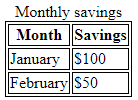
<table>
|
|
|
center |
<p>This is some text.</p>
|
This is some text. This text will be center-aligned. This is some text. |
|
dir |
<dir>
|
|
|
div |
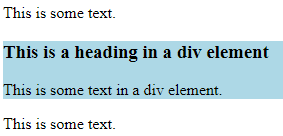
<p>This is some text.</p> <div style="background-color:lightblue">
<p>This is some text.</p> |
|
|
dl |
<dl>
|
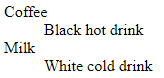
|
|
figure |
<p>The Pulpit Rock is a massive cliff 604 metres (1982 feet) above Lysefjorden, opposite the Kjerag plateau, in Forsand, Ryfylke, Norway.</p> <figure>
</figure> |
The Pulpit Rock is a massive cliff 604 metres (1982 feet) above Lysefjorden, opposite the Kjerag plateau, in Forsand, Ryfylke, Norway. 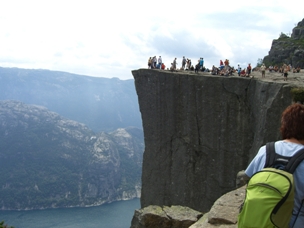
|
|
figcaption |
<figure>
<figcaption>Fig.1 - Pulpit Rock, Norway.</figcaption>
|
Fig.1 - Pulpit Rock, Norway |
|
footer |
<footer>
|
Posted by: Hege Refsnes Contact information: someone@example.com. |
|
h1 |
<h1>Text</h1> |
Text
|
|
h2 |
<h2>Text</h2> |
Text
|
|
h3 |
<h3>Text</h3> |
Text
|
|
h4 |
<h4>Text</h4> |
Text
|
|
h5 |
<h5>Text</h5> |
Text
|
|
h6 |
<h6>Text</h6> |
Text
|
|
header |
<article>
|
Most important heading here
Less important heading here
Some additional information here. Lorem Ipsum dolor set amet.... |
|
hgroup |
<hgroup>
|
Calculus I
Fundamentals
This course will start with a brief introduction about the limit of a function. |
|
hr |
<p>HTML is a language for describing web pages.</p> <hr> <p>CSS defines how to display HTML elements.</p> |
HTML is a language for describing web pages. CSS defines how to display HTML elements. |
|
menu |
<div style="background:yellow;border:1px solid #cccccc;padding: 10px;" contextmenu="mymenu">
<menu type="context" id="mymenu">
</div> <p>This example currently only works in Firefox!</p> |
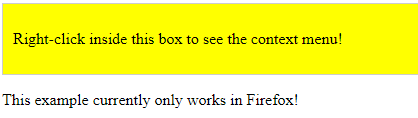
|
|
nav |
<nav>
|
HTML | CSS | JavaScript | jQuery |
|
ol |
<ol>
<ol start="50">
|
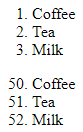
|
|
pre |
<pre>
|
Text in a pre element is displayed in a fixed-width font, and it preserves both spaces and line breaks |
|
script |
<script>
|
Hello JavaScript! |
|
section |
<section>
|
WWF
WWF was founded in 1961. |
|
table |
<table>
|
|
|
ul and li |
<ul>Text</ul> <li>Text1</li> |
|