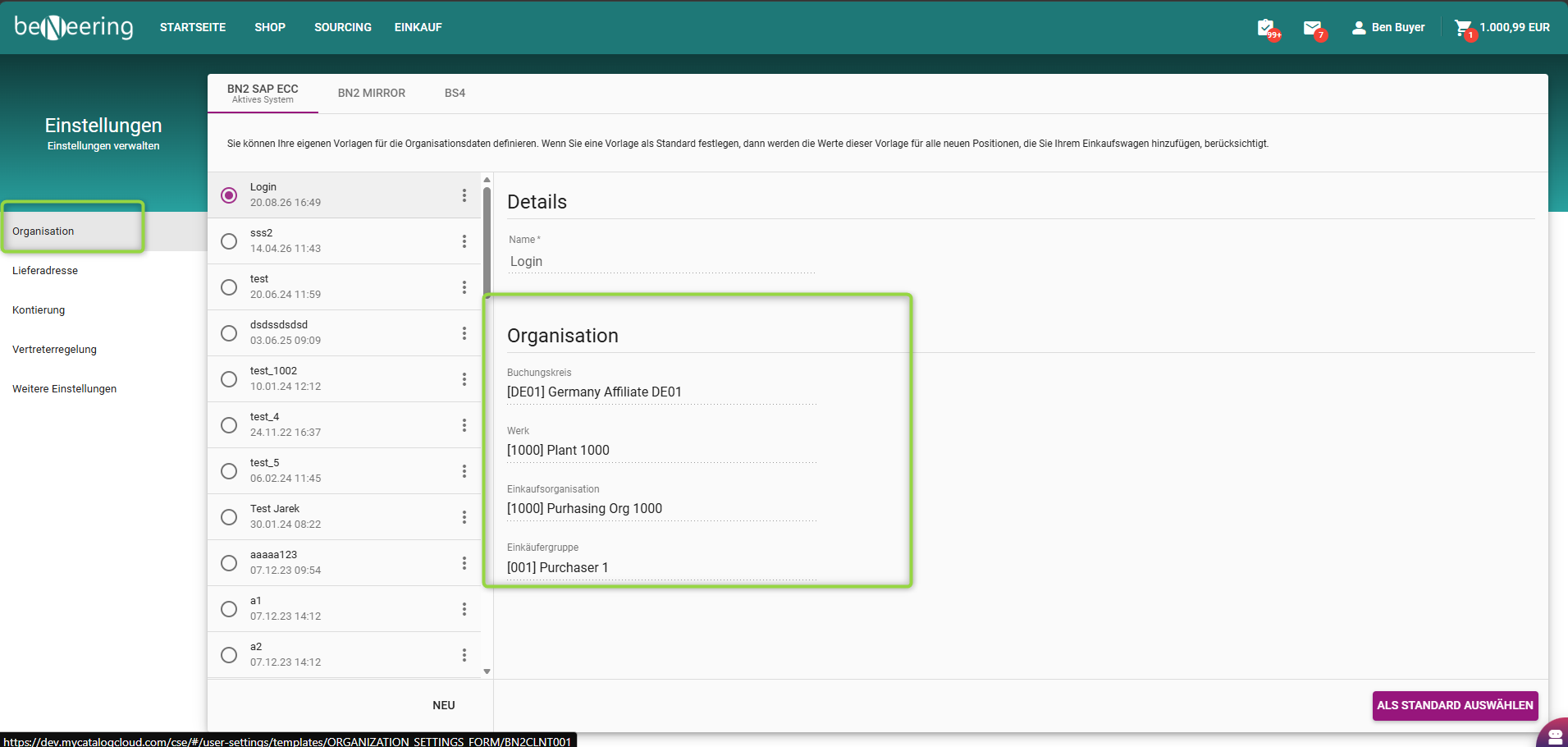
BeNeering stellt eine Organisationsvorlage zur Verfügung, mit der Benutzer ihre Standard-Organisationsstruktur einmalig definieren können.
Felder der Vorlage
Buchungskreis
Definiert die juristische Person, die für Buchungen und Zahlungen verantwortlich ist.
Werk
Definiert den Standort, an dem die Waren oder Dienstleistungen benötigt werden, und ist für die Logistik und die Bestandsführung von entscheidender Bedeutung.
Einkaufsorganisation
Die zentrale Einheit, die für die Beschaffungsaktivitäten in SAP MM verantwortlich ist.
Einkaufsgruppe
Stellt den Einkäufer oder das Einkaufsteam dar, das für die operative Durchführung verantwortlich ist.
Benutzer können ihre eigenen Organisationsvorlagen entsprechend ihren Beschaffungsanforderungen erstellen und verwalten. Beim Anlegen einer neuen Organisation können Werte nicht manuell eingegeben werden; stattdessen können Benutzer nur aus vordefinierten Optionen (wie Werk oder Buchungskreis) auswählen, die von SAP bereitgestellt werden. Diese Optionen sind entsprechend den Berechtigungen und organisatorischen Zuordnungen des Benutzers eingeschränkt, wodurch sichergestellt wird, dass nur gültige und zulässige Daten verwendet werden.
Sobald eine Vorlage als Standard festgelegt ist, werden alle zugehörigen Felder (z. B. Buchungskreis, Werk, Einkaufsorganisation, Einkaufsgruppe) beim Anlegen einer neuen Bestellanforderung automatisch ausgefüllt.
Dies gewährleistet eine einheitliche Dateneingabe und reduziert den manuellen Aufwand.