In this release we are going to have two deployments into production:
(1) Functional upgrade
Scheduled maintenance: Saturday26-Sep-2026 - expected system downtime - between 8 am to 12 pm CET
See below the details of new functions that will be deployed with this release.
(2) Firewall upgrade
Scheduled maintenance: Saturday03-Oct-2026 - expected system downtime - between 10 am to 2 pm CET
We will be replacing the firewall hardware on BeNeering to increase capacity for future traffic growth.
Preface
We are pleased to share details of the upcoming release, which introduces a set of new functionalities and enhancements designed to improve efficiency, user experience, and flexibility across the platform. These updates reflect our ongoing commitment to deliver solutions that support your business needs and evolving procurement processes.
Please note that while some of the features will be deployed automatically as part of the standard release, others are optional and may require additional configuration, enablement, or consulting services. These functionalities will not be activated by default but can be implemented upon request in alignment with your organization’s requirements.
We encourage you to review the release notes carefully and contact your consulting team if you wish to learn more about enabling specific features. Or write to support@beneering.com with a specific query so we are happy to assist you.
Icon
Description
✅
This feature is global standard means active for all customers
⚙️
This feature is free of charge, it can be activated or deactivated
⚠️
This feature requires an update of the SAP Add-On “BeNeering Cloud Adapter” (BCA)
This feature requires an update of the SAP Add-On “BeNeering Cloud Adapter” (BCA)
💲
This feature requires additional implementation efforts on your system - please ask for a quotation if you are interested
🛠️
This feature is available in QA system
Generic Functions
AI Functions
Initiate new Sourcing Event from Intake Assistant
You can now create a Sourcing Event instantly with one click directly from the Intake Assistant, automating your sourcing events when policy requires it.
Ref : CDEV-13094 💲
SOURCING
RFQ Price Comparison - Excel Attachment
Users can now export the RFQ price comparison table to Excel. When adding winning quote items to the basket, the Excel sheet is automatically generated and attached to the Purchase Requisition (PR) for buyer compliance checks.
Ref : CDEV-11891 ✅
RFQ & RFM Email History Logging
Outbound email notifications are now automatically recorded directly in the History tab of your Sourcing Request (RFQ) and Supplier Response (RFM) documents. Users can quickly review sent communications, including timestamps, recipient email addresses, and subject lines, providing full visibility and auditability for all supplier communications in one place.
Ref : CDEV-11899 ✅
PURCHASING
Withdraw a Purchase Requisition from Approval
Requesters can now withdraw a Purchase Requisition from the approval process as long as it has not yet been approved.
If changes are required, the requester can stop the current approval process, update the PR, and submit it for approval again.
This helps avoid inconsistencies and ensures that both requesters and approvers always work with the correct and up-to-date version of the Purchase Requisition.
Ref : CDEV-13219 💲
Print Purchase Requisitions with One Click
We are introducing a new Print function for Purchase Requisitions.
Users can now generate a printable version of the PR directly from the document, including all relevant information in one place.
This makes it easier to share, archive, or use Purchase Requisitions outside the application
Ref : CDEV-13122 💲
Download PR and Approval Task Lists
A new Download option is now available for Purchase Requisition and Approval Task lists.
Users can export the information currently displayed in the list with a single click. This makes it easier to review the data outside the application, share it with colleagues, or use it for further processing.
Ref : CDEV-12963 ✅
Document Flow Now Available in Purchase Orders and Service Entry Sheets
The Document Flow, previously available in Purchase Requisitions, is now also available in Purchase Orders and Service Entry Sheets.
Users can now check the related document flow directly from the Purchase Order or Service Entry Sheet they are working in, without having to navigate back to the Purchase Requisition.
This makes it easier to follow the purchasing process and understand how the related documents are connected.
Ref : CDEV-12966 ✅
Change in Approval Process for Purchase Requisitions in Draft mode
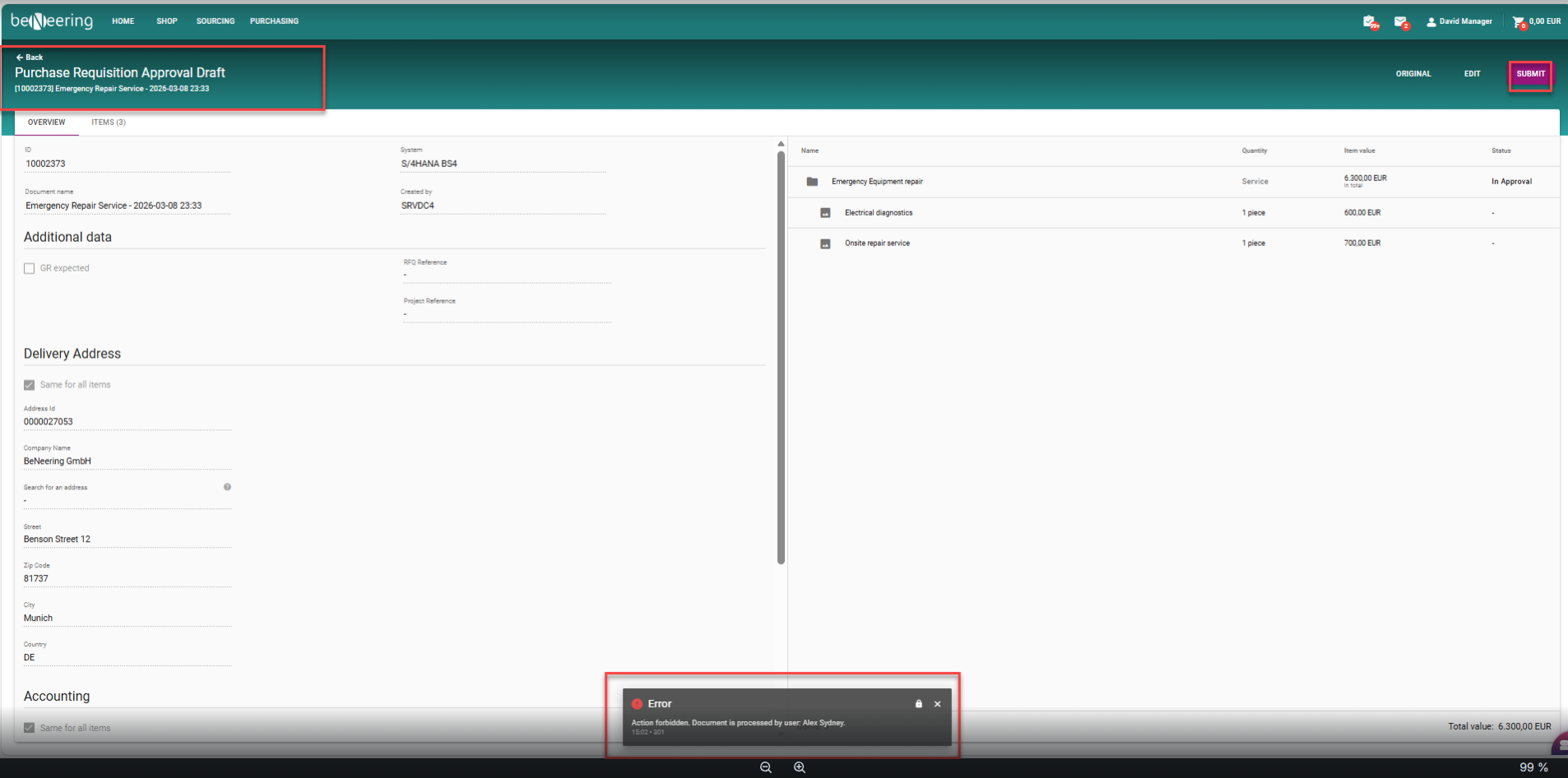
Approvers will now see an alert identifying the owner if an active draft exists on a Purchase Requisition before approving. To prevent confusion, a quick confirmation pop-up will guide your next steps, and the Submit button on PR draft is now hidden for anyone who isn't the draft owner.
Ref : CDEV-12964 ✅
Barcode Scanning for MyCart
Customers can now scan physical article or shelf barcodes to instantly find and add items to your cart. The system automatically matches products using their Buyer AID, Supplier AID, or EAN. Just scan, enter your quantity, and push items straight to your Basket without manual searching.
Ref : CDEV-10199 💲
Extend the Approval Inbox by adding a new "Total Value" column
The Total Value column has been added to the Approval Inbox.
Approvers can now see the total value of each Purchase Requisition (PR) directly in the list, before opening the document.
This gives approvers a better overview of the requests they need to work on.
Ref : CDEV-12982 ✅
Introducing Bulk Confirmation
Introducing Bulk Goods Receipts & Service Confirmations. You can now select all Goods Receipts (GR) or Service Entry Sheets (SES) in a PR with a single click, automatically committing open quantities to avoid manual confirmation. This logic will also set the final delivery flag on PO.
Ref : CDEV-12932 ✅
Document search by filter "created by" after user deactivation
Inactive and deactivated users now remain searchable in the "Created by" document filter help menus. You can continue to search, track, and filter historical documents (PRs, POs, GRs, and SES) originally generated by past team members.
Ref : CDEV-12930 ✅
Admin Functions
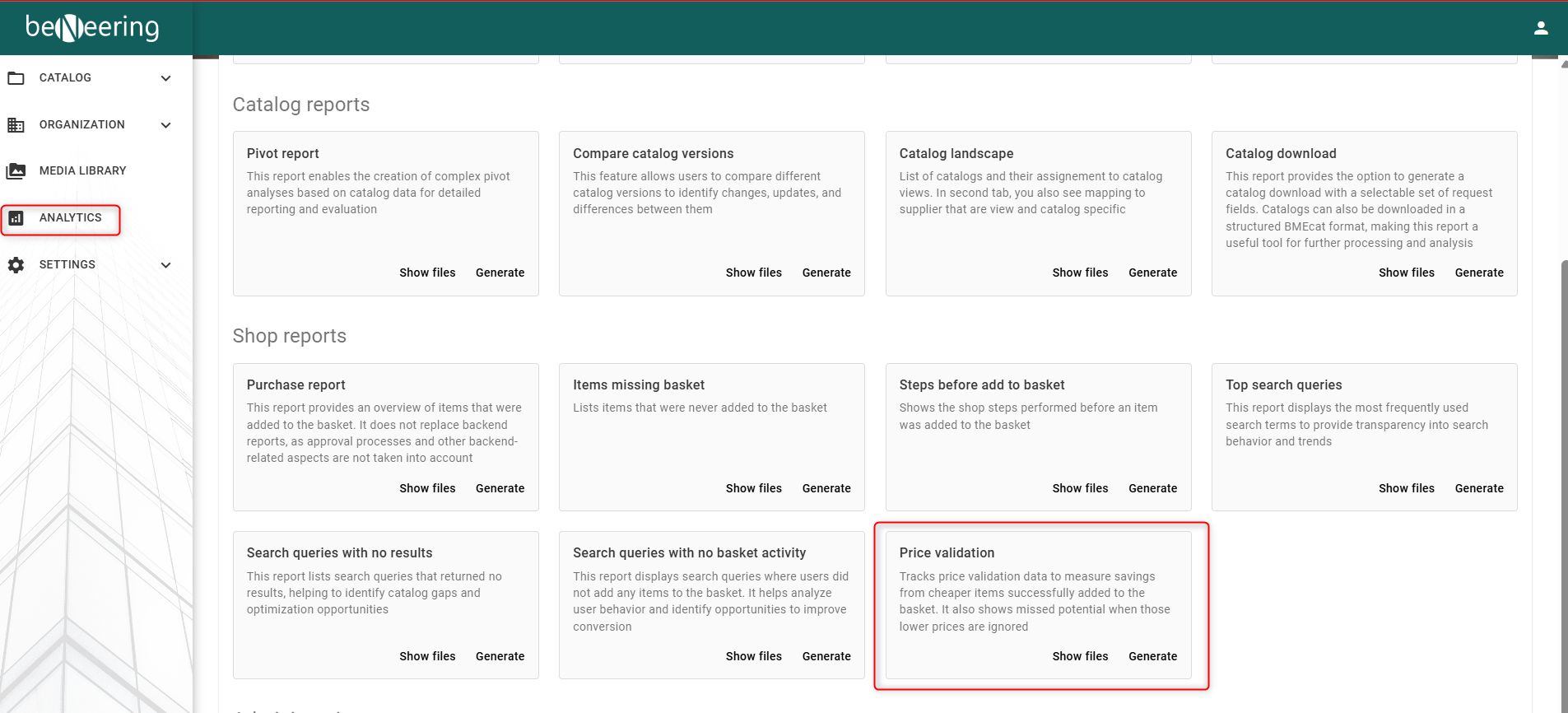
Analytics / Reporting - New Reporting Tile - Price Validation
A new reporting tile tracks BuyBox usage and savings opportunities across your organizational hierarchy. Users can select custom date ranges (up to 12 months) to monitor how often cheaper options were displayed, how frequently requesters chose them, total Realized Savings, and Missed Potential.
Ref : CDEV-13006 💲
Simplified - Managing Teams User
Users can now be assigned to approval and notification teams across any organization, regardless of their position in the org hierarchy. This allows regional and global employees (e.g., Europe-wide managers) to easily join local country approval teams without altering your underlying org structure.