Expected system downtime - between 7 pm and 10 pm CET.
Preface
We are pleased to share details of the upcoming release, which introduces a set of new functionalities and enhancements designed to improve efficiency, user experience, and flexibility across the platform. These updates reflect our ongoing commitment to deliver solutions that support your business needs and evolving procurement processes.
Please note that while some of the features will be deployed automatically as part of the standard release, others are optional and may require additional configuration, enablement, or consulting services. These functionalities will not be activated by default but can be implemented upon request in alignment with your organization’s requirements.
We encourage you to review the release notes carefully and contact your consulting team if you wish to learn more about enabling specific features. Or write to support@beneering.com with a specific query so we are happy to assist you.
Icon
Description
✅
This feature is global standard means active for all customers
⚙️
This feature is free of charge, it can be activated or deactivated
⚠️
This feature requires an update of the SAP Add-On “BeNeering Cloud Adapter” (BCA)
💲
This feature requires additional implementation efforts on your system - please ask for a quotation if you are interested
🛠️
This feature is available in QA system
Generic Functions
Legacy Catalog Cloud Services (CCS) - CCS Login retirement and migration to BeNeering Cloud (BC)
As we continue to enhance your experience on our new platform - BeNeering Cloud (BC), we are officially retiring All the functions in CCS with an exception to Start Page Editor and Notification Customizing (Moved next release). These functions have been replaced and integrated in the New Portal - BeNeering Cloud (BC).
Customers / Users will no longer have direct access to the legacy CCS environments (Dev, QA, and Production).
New document type → Data Sheet with new workflow ✅
SOURCING
Employee Team function and User connection
We are changing the way user permissions are managed by moving away from individual "User-to-Employee" connections in favor of a more efficient Team-based model.
Key Changes :
Role Inheritance: Users now inherit their roles, authorizations, and filters directly from their assigned TEAM.
New "TEAM" Function: We are replacing legacy distribution lists with a new grouping logic. For now, this new logic will run alongside the old system to ensure a smooth transition.
Note : Users can no longer edit the relationship between employees and users in the CCS or BC portals. This has been moved to Display Only to protect data integrity during the migration.
REF : CDEV-11069 ✅
PURCHASING
Prioritizing role impact and responsibilities over technical titles.
We’ve enhanced the user interface for role assignments by putting role descriptions front and center. Now, users can focus on what each role actually does rather than just its technical name; Role descriptionswill be available in both English and German, so users can see what each role actually does in their preferred language making role selection faster, easier, and more intuitive.
Ref : CDEV-12456 ✅
Ref : CDEV-12466 ✅ 🛠️
DCF Mandatory Relations (Standalone Mode)
We have enabled Mandatory Relation logic for the Digital Configuration Framework (DCF) when operating in Standalone Mode. This update ensures that all required dependencies are correctly enforced during the selection process. This fix also addresses previously reported issues with missing mandatory/related items in standalone mode.
Automatic Basket Addition: When a primary item is added to the basket, all mandatory related items are now automatically included.
Ref : CDEV-12562 ✅
Workitem approval list show only personal user workitems
We have updated the default behavior of the "I am substituting" filter to provide a cleaner, more focused entry point for approvers.
1. The "I am substituting" checkbox is now unchecked by default.
2. Upon login, the workitem approval list (top-right corner) and the main approval center will now display only the user’s own tasks.
3. Tasks for which the user is a designated substitute will only appear if the user actively selects the "I am substituting" option.
Ref : CDEV-12647 ✅
Easier Access to PR messages and PRs for all Message Participants
Even if a user normally doesn’t have access to a Purchase Request (PR), they can now read the message and display the PR once they are added as a participant to the message. This makes it easy to follow the PR and communicate quickly. everyone else who isn’t a participant still cannot access it.
Ref : CDEV-12535 ✅
Substituting and Messaging
We’ve refined the user interface to make daily work with messages and approvals noticeably clearer and more efficient especially when acting as a substitute.
From now on, items and messages you handle as a substitute are no longer mixed into your main view in the Approval and Messaging widgets in Home Page. This gives you a clean separation between your own responsibilities and substituted tasks, Substituted items are still available in the full lists by checking the chekbox “I am substituting”
When opening a message as a substitute, you can now add yourself as a participant in the conversation. If needed, you can also remove participants, helping you take over responsibility and ensure it is clear who is actively handling the message.
In addition, the message overview has been improved: the participants list is now shown by default. This gives you immediate context without extra clicks, while still allowing you to collapse or hide the section anytime.
Ref : CDEV-12364 ✅
Ref : CDEV-12211 ✅
Catalog Approval History
We’ve simplified how you track catalogs through the approval process. No more searching through old reports—everything you need is now visible in the Catalog module.
"Your Approval" : A new filter show you exactly which catalogs are waiting for your action right now.
"In Approval" Filter: Want to see where a catalog is stuck? Use this filter to see all catalogs currently being reviewed, even if someone else is the approver.
Live Approval History: Click the new "Approval" button to see a full timeline of who approved or rejected a catalog and when.
Future Forecast: You can now see the current and next steps in the approval chain, so you know exactly who needs to sign off next.
Ref : CDEV-12200 ✅
CWF Workflow Stabilization
BCA workflow connector can now be set up to use the SAP Workflow Queue. In result, the PR changes can be better controlled, re-published to BeNeering Cloud and traced with the SAP Workflow Queue Monitor.
Ref : CDEV-12326 ✅
CWF Workflow Detail synchronization with BCA
New BCA feature provides for workflow detail synchronization on the customer system. CWF data is saved in the customer system and can be accessed there after the retention period in BeNeering Cloud.
BCA Workflow Panel is enhanced so that the workflow detail can be read from either BeNeering Cloud or BCA archive.
Ref : CDEV-12508 ✅
Admin Functions
Data Deletion & Management
We have restored the ability for customers to manage and delete core data elements within the BeNeering Cloud (BC). This update resolves previous limitations where customers were unable to delete.
Enabled Deletion Capabilities
User & Approver Profiles
Organization
Catalog Containers
Ref : CDEV-12553 ✅
Media Library
We have restored the ability for customers to download PDF files from the Media Library within the BeNeering Cloud (BC). This update resolves previous limitations where customers were unable to download or copy link that was earlier available in CCS.
Ref : CDEV-12752✅
Analytics - Improvement to Compare catalogs versions and Catalog download reports
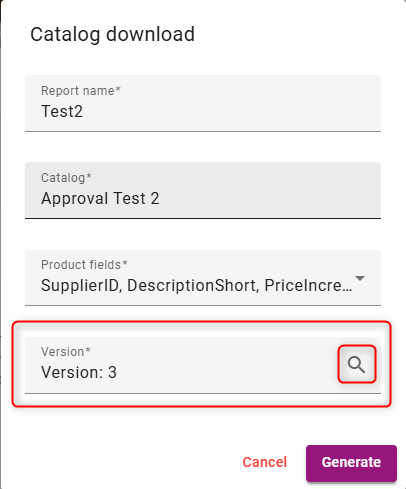
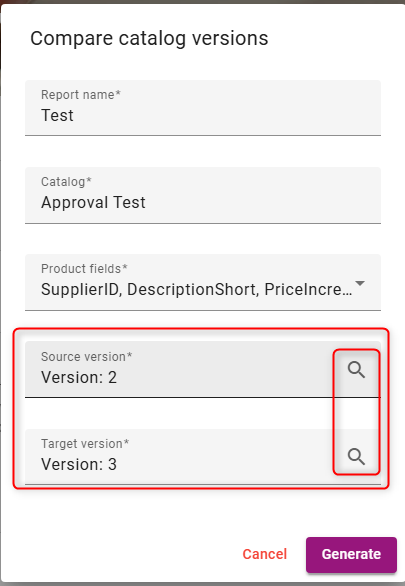
We have enhanced the search experience for Compare Catalogs and Catalog Download reports. Users no longer need to remember exact filenames to find the data they need.
Keyword Search: Enter any part of a Catalog name or catalog title into the selection field. As you type in the search field, the system instantly filters and displays all matching versions.
Select Instantly: The system filters results as you type, allowing you to click and proceed immediately.
Reference : CDEV-12669 ✅ 🛠️
JavaScript errors detected
Please note, these errors can depend on your browser setup.
If this problem persists, please contact our support.