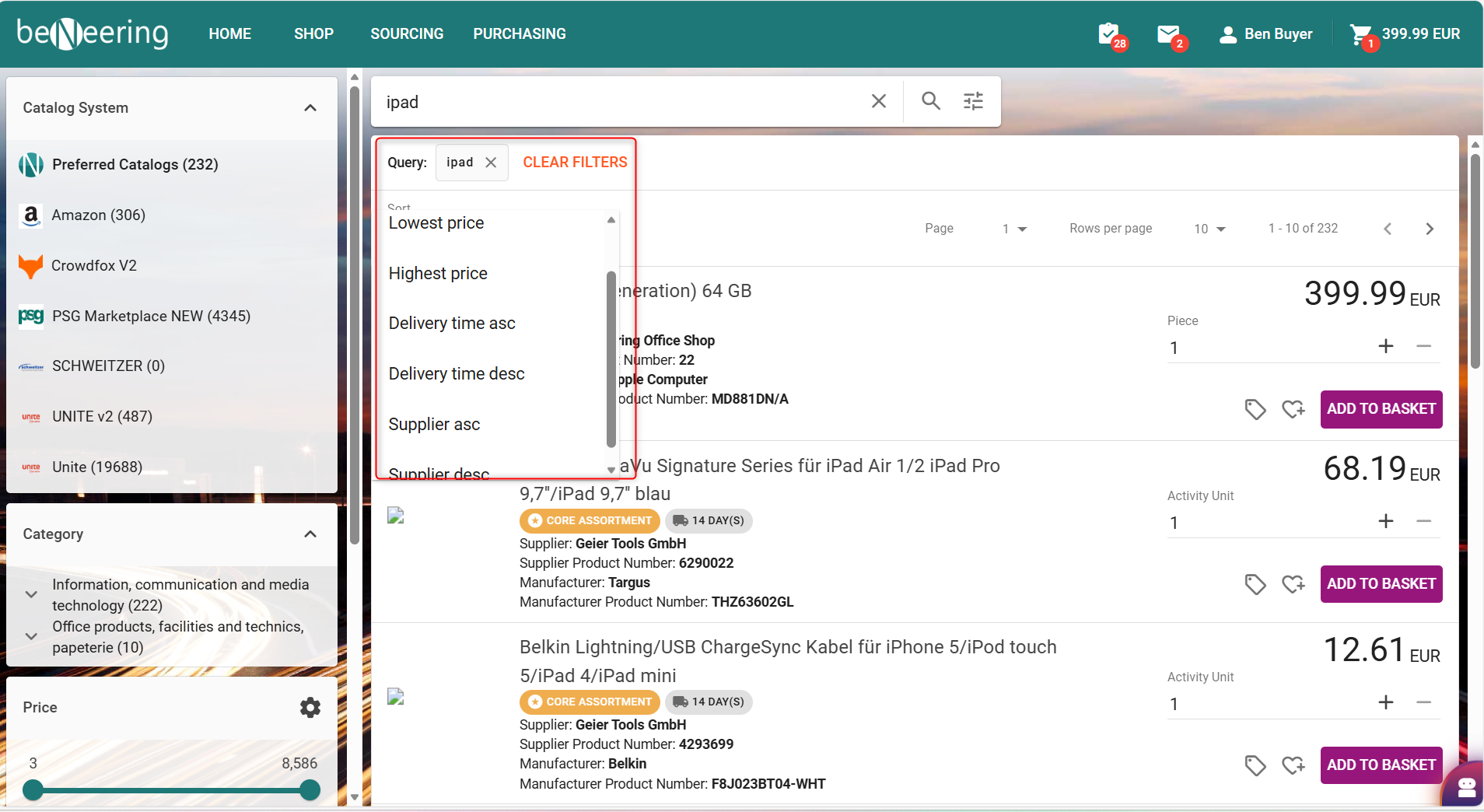
The Catalog Search now includes a Sorting feature that helps users quickly organize and review search results based on key criteria such as Supplier, Price and Delivery Time.
This enhancement improves usability and ensures users can efficiently find the most relevant purchasing options. The sorting options are available on the Catalog Search Results page.
-
Sorting Options Available
Users can sort results based on the following attributes:
✔ Supplier
-
Supplier ascending / Descending (A → Z or Z → A)
✔ Price
-
Sort by lowest price first
-
Sort by highest price first
✔ Delivery Time
-
Sort by shortest delivery time
-
Sort by longest delivery time
-
How to Use Sorting (Step-by-Step)
Step 1: Perform a Search
-
Go to the Catalog Search
-
Enter your search criteria (e.g., product name, supplier, material group).
-
Click Search to display results.
Step 2: Access Sorting Options
You will see a Sort By control above the results list.
This may appear as:
-
A dropdown menu, or
-
Clickable column headers
Step 3: Choose Your Sorting Criterion
Select one of the available options:
-
Supplier
-
Price
-
Delivery Time