
Adding Notes in the Basket
In the Basket, you can add notes for each individual item.
Steps:
-
Open the Basket.
-
Navigate to the Items Level.
-
Select the required item.
-
Enter your text in the fields:
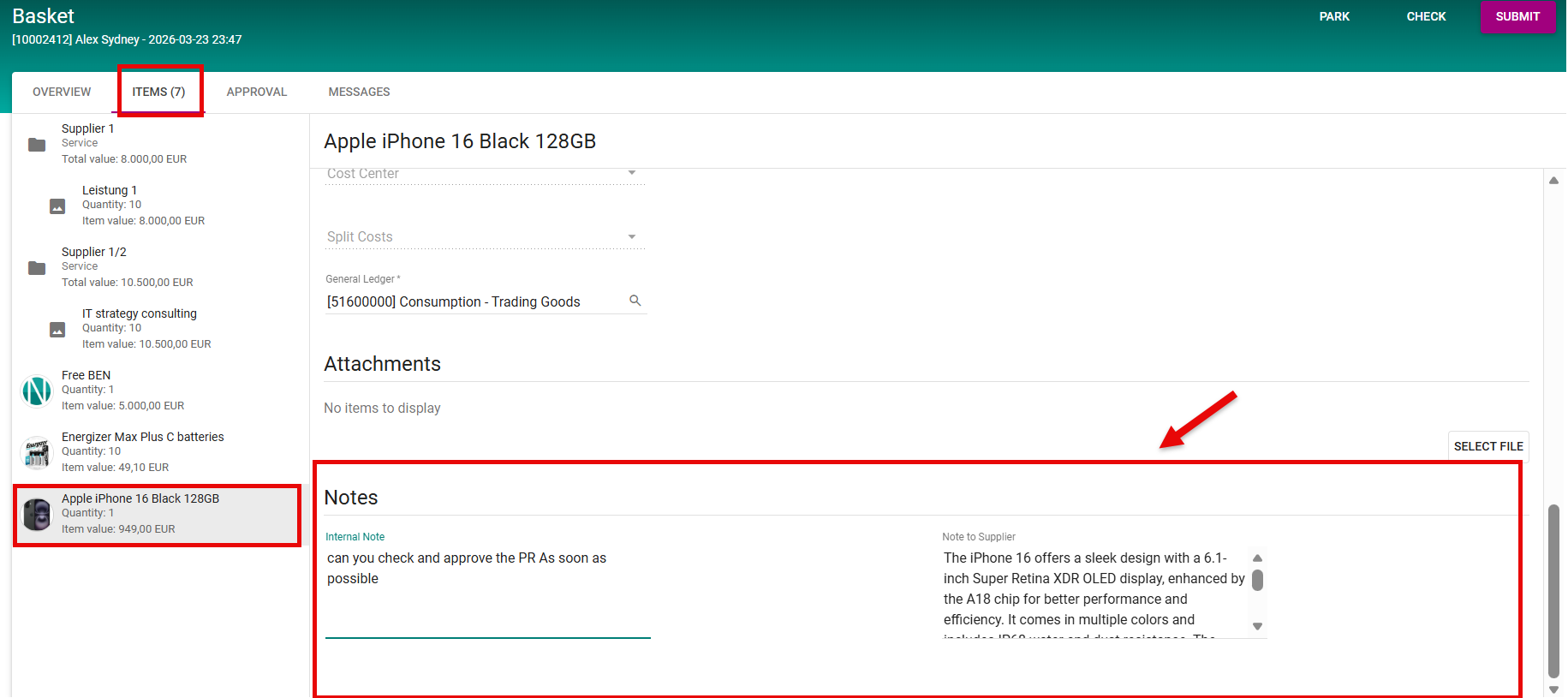
-
Press
submit
Standard Notes Fields (Default Mapping)
-
Internal Notes
-
You can enter any text relevant for internal use.
-
In SAP, this text is mapped to Text ID B01 and appears as Item Text in the Purchase Requisition (PR) GUI.
-
-
Note to Supplier
-
You can enter any text intended for the supplier.
-
In SAP, this text is mapped to Text ID B03 and appears as Delivery Text in the PR GUI.
-
Customer-Specific Fields
-
The Basket also allows the addition of custom fields.
-
These fields can be mapped to the corresponding SAP PR fields based on customer-specific logic.
-
The mapping and behavior of these fields depend entirely on the custom configuration of the customer system.
Notes
-
All notes added at item level in the Basket are automatically transferred to the appropriate SAP PR item fields once the PR is created/submitted.
-
Standard SAP text fields (B01, B03) are used as defaults, but custom text mappings can be implemented if required.